
Manage Tax Rates
Review existing taxes and open the New Tax form for rate, inclusion, and location settings.
Who is this article for?
Tax configuration requires Full Crunch. Open Tax Management, where you can review existing rates and open the dedicated creation form.
Review current taxes
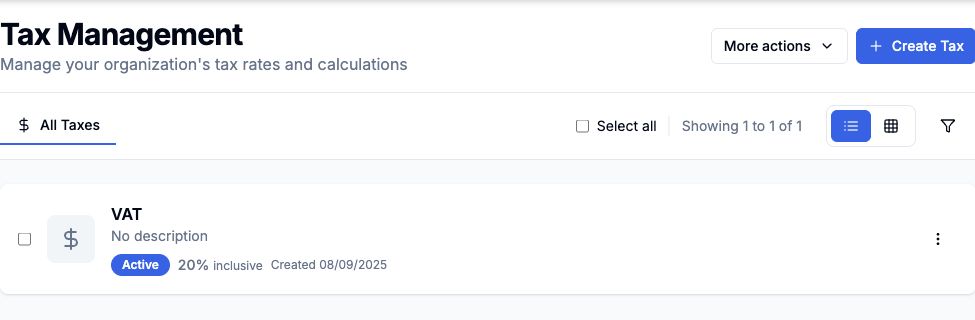
The page includes:
- An All Taxes tab
- More actions
- Create Tax
- List and grid view toggles
- A filter icon
Each tax row shows its name, status, rate, inclusion type, and created date.
 View larger
Open the New Tax form
Complete the Tax Information section with Tax Name, Tax Rate (%), Inclusion Type, and an optional description.
Review Locations & Auto-assign to control where the tax applies.
Use the Active checkbox in the Status section to control whether the tax can be used. Review the preview, then choose Create Tax to save.
Info
The form includes a live Preview card on the right so you can check the tax type and active state before saving.
Location management
Organisation settings
Billing invoices and history